⚠️ Check if your desk is compatible
There is no guarantee that the DeskUp Pro device will work with your desk as desk manufacturers could change their internal electronics and software at any time, even on the same model number. However so far we’ve only seen Maidsite remove the RJ12 port on one controller model and have had no reports of anything else on the list not working.
Where we know of limitations we have mentioned them. Every desk known to us that works or doesn’t is in the lists below.
If your desk is not on the list we cannot advise on its compatibility until someone tries it. Which is why we ask that if you do try the DeskUp Pro and your desk is not on our list please let us know so we can add it here to help others.
This is a product of reverse engineering, so until you try it on your desk there is no way to be 100% certain that it will or won’t work.
You should understand these risks before purchasing any components to build this yourself or if you purchase a prebuilt one from the shop. It’s your responsibility to determine if its fit for your purpose.
Your desk must also have a free RJ12 port on the controller (6 pins):
- Sometimes it’s an RJ11 port which is the same size it just has 4 pins. Which is fine because even with the 6 pin RJ12 we only use 4 wires anyway. The 1st and last wires are not used.
- Sometimes the controller will indicate an RJ11/12 with an ‘F’ next to it.
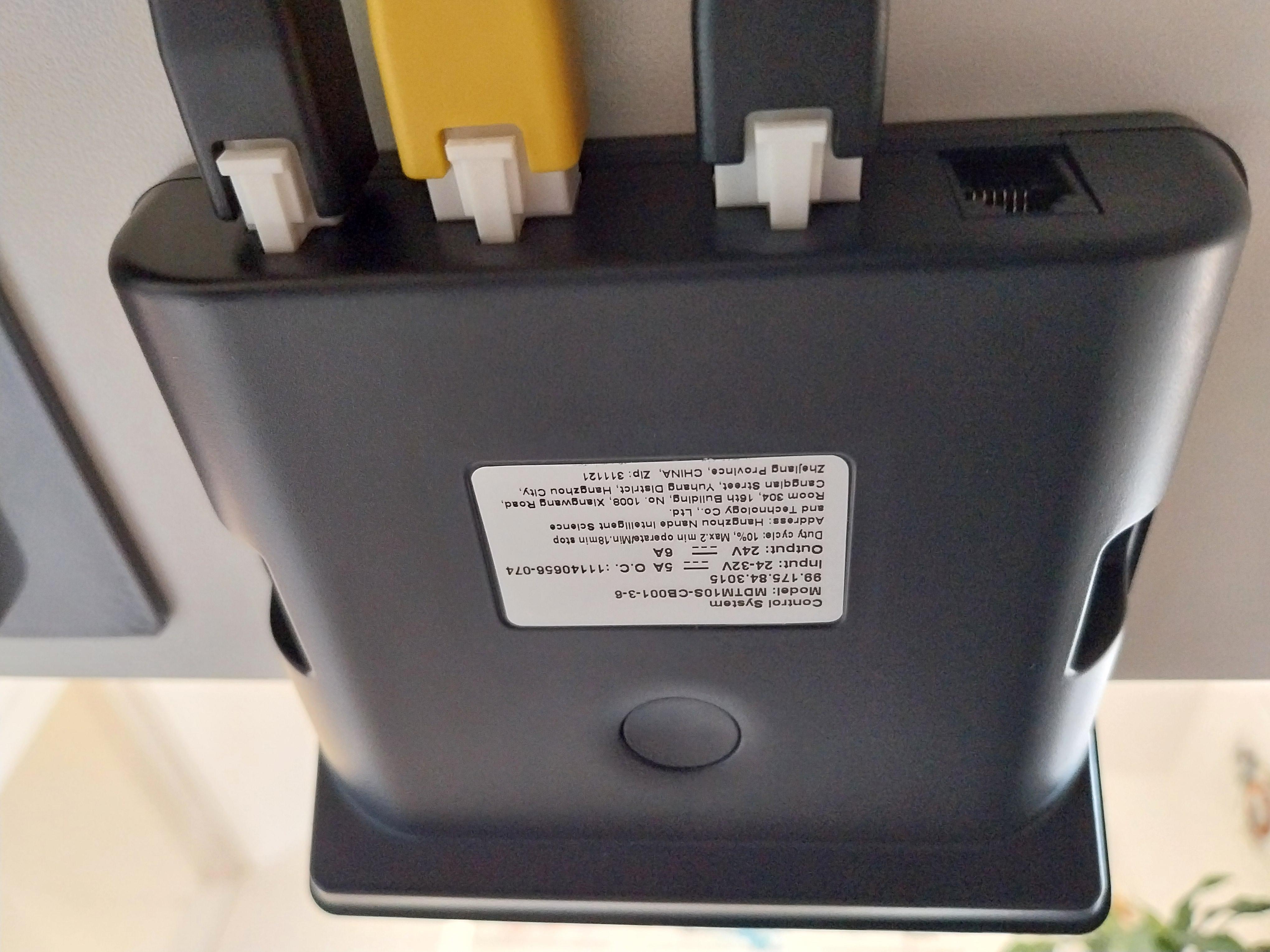
Below is a list of desks we know should be compatible but any desk with an RJ11 / RJ12 port could work.
Summary of Compatible Desks or Controllers
- Maidesite TH2 Plus Art
- Maidesite T2 Pro
- Maidesite T2 Pro Plus
- Maidesite SC2 Pro
- Maidesite EL2 Pro Art
- Maidesite EL2 Plus Art
- Maidesite S2B Pro
- Maidesite T1 Pro
- Maidesite SN1
- Desktronic Home One
- Desktronic Pro
- Boho Office Basic Line
- Jiecang JCB35M11C, JCHT35K72C, JCB36N2CA-230, JCB36N2HAG-230, JCHT35K9-003-v4, JCB36NE2, JCB36M (so probably any Jiecang might work)
- Desktopia Pro X
- IKEA Uppspel
- Omnidesk
- Fully Jarvis
- Vari Desk Essential
- Hibitaro Komfort M708
If your desk works but is not in the list please let us know by logging an issue for us to update this page so we can help other people.
Incompatible Desks or Controllers
- IKEA Mittzon
- Vonhaus Desk with controller model: M200-23-CH, M150-22-PJ
- Eureka Ergonomics standing desk with control box: erk-cb-2m-bca84a
- Fezibo
Working Desks in more Detail
Maidesite desks using the Premium controller
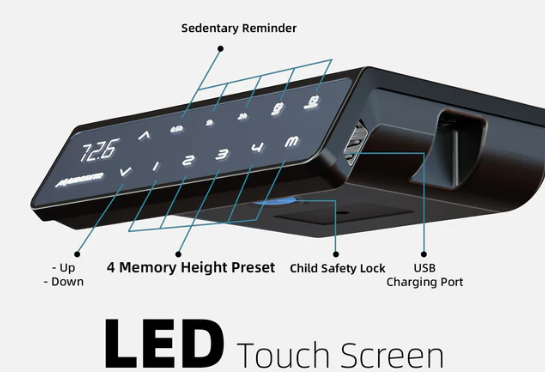
These desks should be compatible as they come with this controller. The TH2 Plus Art desk was the desk used when creating this project which was originally on the Maidesite forum. Members of this community have used some of these desks.
- TH2 Plus Art
- T2 Pro
- T2 Pro Plus
- SC2 Pro
- EL2 Pro Art
- EL2 Plus Art
- S2B Pro
Maidesite desks using the Standard controller
These desks should be compatible as they come with this controller:
- T1 Pro
- SN1
A member of the community confirmed the SN1 works in this post. Therefore the other Maidesite desks using the Standard controller should also be compatible.
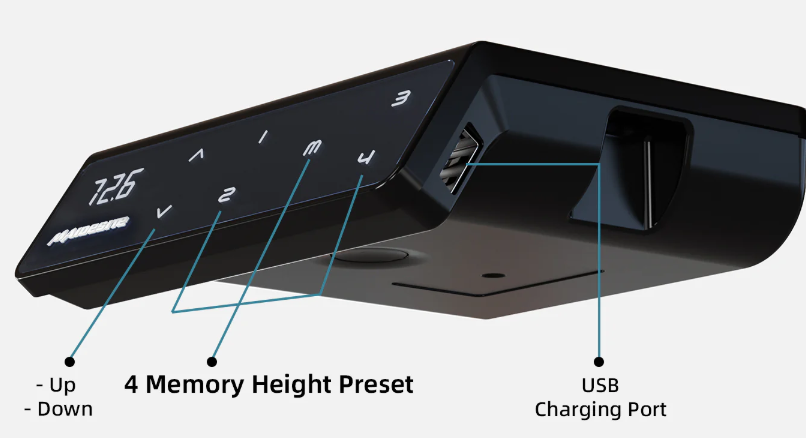
Note: Maidesite have changed the Standard controller in a version manufacturered in July 2025 and removed the RJ12 port, so check the back of the controller.
Other manufacturer desks or controllers that should be compatible
Members of the community have tested these desks or controllers on other similar projects to this one, which send the same commands so there is a good chance these are compatible.
Desktopia Pro X
Confirmed working once the correct pins were specified in config.
Mentioned here in the last post in this chain.
They used the Rocka84 repo which confirms the cable pins do match the ones used in this project. And desk hex codes also match.
That post also suggests the desk can go to sleep so you may need to enable the ‘Send wake up command’.
Ikea Uppspel
Confirmed working using RJ11 cable (4 pins which is fine as RJ12 has 6 but only uses 4)
They used the Rocka84 repo which confirms the cable pins do match the ones used in this project. And desk hex codes also match.
Jiecang JCB35M11C
Confirmed as device used at top of this post
This is the controller used by Rocka84 on his repo so this confirms the cable pins do match the ones used in this project. And desk hex codes also match.
Jiecang JCHT35K9-003-v4 used on a Desky Duel Sit Stand Frame
Desk used is this one and confirmed working on the Rocka code in this post
They used the Rocka84 repo which confirms the cable pins do match the ones used in this project. And desk hex codes also match.
Jiecang JCHT35K72C
Confirmed partially working in issue 2 here
Preset buttons & sensors on this controller are confirmed as working, but using the height control slider to set the height to a specific value doesn’t work. Its likely this controller doesn’t support this capability.
But most of the automations you can do would use the buttons and sensors. However since the cover control also uses the slider’s set height capability and Google Assistant or Alexa both use the cover control (if you expose it to these) you wont be able to control the desk from these Assistant’s.
It’s very likely that other Jiecang controllers are supported too which are used on Fully Jarvis and Desky desks.
Omnidesk
Confirmed working in this post
They used the Rocka84 repo which confirms the cable pins do match the ones used in this project. And desk hex codes also match.
But you may need to toggle on the ‘Send wake up command’ as the desk controller may go to sleep, this will wake the desk controller up then send the button command you asked for.
Desktronic Home One
Confirmed working by GitHub user nurtext.
Uses a whitelabeled Jiecang JCB36NE2 control box.
But you may need to toggle on the ‘Send wake up command’ as the desk controller may go to sleep, this will wake the desk controller up then send the button command you asked for.
Desktronic Pro
Confirmed working in this post
But you may need to consult the desk manual as the user had to change the desk controller to be single touch and not constant touch (which it ships with, which sounds like the same issue with the Boho Office below)
Boho Office Basic Line
Desk: Boho möbelwerkstatt GmbH
Controller: Jiecang JCB36N2HAG-230
Confirmed working by user prbit1:
“This seems very similar to the already-listed Jiecang-based setups like the Desktronic Home One. I had to enable/toggle “send wake-up command” because the controller goes to sleep after a few seconds; with wake-up enabled it works perfectly.”
User Raykor reported:
I had to activate the “automatic mode” on the controller / desk first – after that, the desk moves with a single press of the buttons on the desk or in the GUI / in Home Assistant without this the desk kept stopping. This is documented for the Boho Basic Line desk starting from page 26 in the PDF here: https://www.boho-moebel.de/media/ef/35/a3/1727164715/boho-BASIC-de_en.pdf
Fully Jarvis
Confirmed working on controller Jiecang JCB36N2CA-230.
Preset buttons & sensors on this controller are confirmed as working, but 1 of the 4 users that we know who use this controller have reported that using the height control slider to set the height to a specific value didn’t work for them.
Vari Desk Essential
Vari Desk Essential confirmed working by user RCG-RCorrales on this desk
Hibitaro Komfort M708
Confirmed working on a Hibitaro Komfort M708 desk with controller Jiecang JCB36NE2A-230.
You need to switch the desk from constant-touch-memory to one-touch-memory, details were provided in issue 19 by user afaik4711.
Links to other community info used when compiling this list
https://www.maidesite.co.uk/pages/buyer-guide
https://github.com/phord/Jarvis#physical-interface-rj-12
A comparison of the different community projects and reverse engineered desk hex codes can be found here.