Home Assistant Screen Layout - What it all does - Configuration
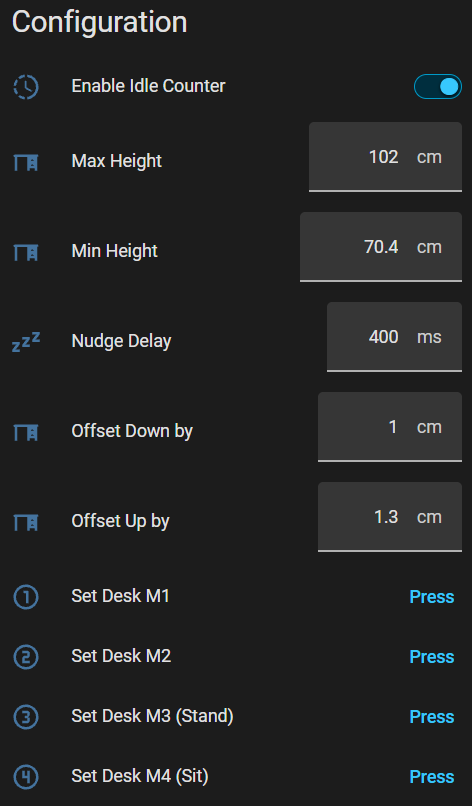
Before using your DeskUp Pro you need to configure the min & max height values for your desk:
| Home Assistant | |
|---|---|
|
Enable Idle Counter
This turns on/off the 2 sensors Idle Time & Idle Timestamp. This is for the people who do not want the data sent to Home Assistant e.g. you wont be using these sensors on any dashboards.
Max Height (defaults to cm)
You should set this to either:
-
Match your desks physical maximum height limit. If you dont know it just raise your desk to its maximum height and use the value from the desk control panel here.
-
Or set the desk to be the maximum height you will use on a day to day basis.
Doing this gives you a better experience when using the cover slider as this has go up (100%) & go down (0%) buttons.
Note: This does not prevent you using memory preset buttons or nudge up/down controls to move the desk outside of this range.
Min Height (defaults to cm)
The instructions are the same as the description above, just for setting the minimum height.
Nudge Delay (ms)
Text box to manually add a delay (in ms) when the nudge up/down controls are used. It’s only used by these 2 controls.
This was key to preventing the nudge command just moving its default height when 1 height hex command is sent.
The default height seems to vary but on average going up by 4.3 (+-0.1) and going down by 3.7 (+-0.4)
This box lets you drastically reduce this, but it’s not 100% guaranteed to prevent the default happening but seems to work quite reliably.
Offset Down By (defaults to cm)
Use this to fine tune the distance the desk travels when using the cover & desk height slider controls. Note this is never going to be 100% accurate on Flexispot desks where you say move to 89.7cm it will sometimes be this but usually pretty close to it.
1cm worked well for my desk.
Offset Up By (defaults to cm)
Same description as above, and 1.3cm worked well for my desk.
Set Desk M1, M2, M3, M4 buttons
Pressing these will set the current desk’s height in to the corresponding memory number preset on the desk’s controller.